Integration Approaches
There are two fundamentally different ways to integrate Haidy into your application. Understanding the difference is the most important decision you make before starting your integration.
In short: API-only puts all the work on you, while jump-off hands the heavy lifting to Haidy and is the recommended approach.
The two approaches
1. API-only integration: not recommended
In the API-only approach, your application talks directly to the Haidy API for the entire workflow: recording audio, submitting it for transcription, generating reports, and rendering the results back to the user.
This approach places the full responsibility on you:
- Audio recording must be implemented and maintained in your application.
- Report rendering, including references, formatting, and layout, must be reproduced correctly in your UI.
- Processing logic, such as task polling and error handling, must be built and kept up to date.
While the API is fully capable of supporting this, it is not recommended for most integrations: it is significantly more work to build, and you have to keep pace with every change in the rendering and processing behaviour.
2. Jump-off-based integration: recommended
In the jump-off approach, your application and Haidy sync data in the background, and the user is redirected to the Haidy UI to perform a specific action, such as recording a consultation or reviewing a generated report. The user can perform the action in the Haidy UI in their browser, or on a mobile phone using the Haidy app. Once the action is finished, the user is redirected back to your application.
The write-back can work in two ways: your application retrieves the finished results from the API (as shown above), or Haidy informs your application via a webhook when the results are ready, so you don't have to poll for them.
When Haidy pushes a first-time approval to your application via a write-back webhook, the consultation payload still has approved set to false. Haidy only sets the flag to true after the write-back succeeds, so a failed write-back leaves the consultation unapproved and allows the user to retry the approval.
This solution is much easier to implement because you do not need to take care of:
- Smartphone recording. A key advantage of the jump-off approach: your users can record consultations on their smartphones with the Haidy app, which is purpose-built and tested for medical dictation, so you don't have to build or maintain your own recording.
- Correct rendering of reports: the Haidy UI renders the report, including references and formatting, correctly, so you don't have to replicate that in your application.
How Haidy works
To choose the right approach, it helps to understand what Haidy is, and what it is not.
Haidy is not the main repository for all of your patient information. It is designed as a short-lived system that executes specific jobs:
- It receives the context it needs for a task (patient data, documents, etc.).
- The user is redirected into Haidy to perform a specific action.
- Once the action is complete, the results are written back to your system.
An EHR workflow consists of many steps, from planning a consultation in the calendar, conducting it, documenting it, billing for it and communicating with other medical specialists. Haidy is not meant to replace that process; instead, it is like a puzzle piece that can be plugged in at multiple positions to automate individual steps:
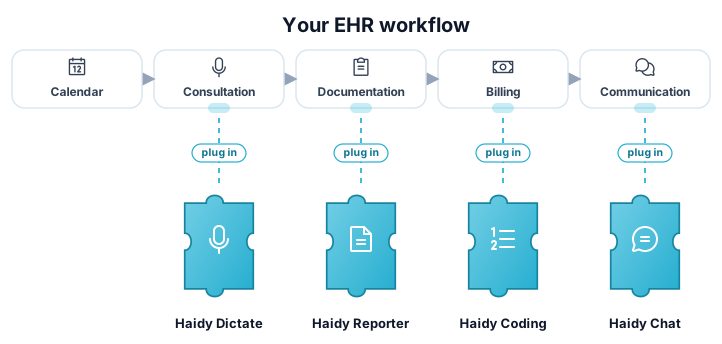
A complete integration is therefore always two-sided:
- Jump-off with context sync: you push the required context to Haidy and redirect the user to the Haidy UI.
- Write-back: the finished results (e.g. an approved consultation report) are written back to your application, so your system remains the source of truth.